


Turntable problems often sound more serious than they are. A silent system may simply be connected to the wrong input; a loud hum can come from a grounding or cable issue; skipping may be caused by setup rather than a damaged stylus. The most useful approach is to trace the signal in order, changing one thing at a time.
This guide covers the problems most commonly encountered with belt-drive decks, moving-magnet (MM) cartridges, moving-coil (MC) cartridges, built-in phono stages and Bluetooth transmitters. It applies equally to a straightforward wired setup and to more feature-rich designs such as the TEAC TN-400BT X/TB, which combines a factory-installed Audio-Technica AT95E cartridge, switchable phono amplification and Bluetooth transmission.
Start with these checks
Before adjusting the tonearm or suspecting a failed component, make the basic checks that eliminate the most common causes:
- Confirm that the turntable, amplifier, active speakers or Bluetooth receiver are powered on.
- Check that the amplifier is set to the input receiving the turntable signal.
- Make sure the record is actually spinning and that the stylus guard has been removed.
- Inspect both RCA plugs and push them fully into the correct left and right sockets.
- Check whether the turntable’s output is set to PHONO or LINE, if it has a built-in phono stage.
- Lower the volume before repeatedly starting and stopping playback.
Use a familiar, clean record for testing. A scratched or badly warped disc can introduce several symptoms at once, making diagnosis unnecessarily difficult. Also keep the stylus and record surface clean; dust can cause ticks, mistracking and apparent channel loss without there being an electrical fault.

No sound from either channel
Start at the amplifier or speakers. Select the input used by the turntable, confirm that mute is off, and test the system with another source if possible. If another source is also silent, the problem is downstream of the turntable.
Next, check the phono connection. A turntable with its internal phono stage bypassed must feed a dedicated phono input or an external phono preamplifier. A turntable with its phono stage switched on should normally feed a line-level input such as AUX, LINE or CD. Feeding a phono-level signal into a line input produces very low output; feeding a line-level signal into a phono input can produce excessive level and distortion.
The TEAC TN-400BT X/TB is a useful example of why this switch matters: its built-in phono amplifier can be used for a conventional line-level connection or bridged when an external phono amplifier is preferred. Do not assume that a turntable’s RCA sockets always provide the same type of signal.
With the amplifier switched off or its volume fully down, reseat the RCA cables. If the deck has a separate ground wire, connect it to the grounding terminal on the phono stage or amplifier. If there is still no output from either channel after trying a known-good cable and input, stop increasing the volume. A fault inside the turntable, phono stage or amplifier should be assessed by a qualified service technician rather than investigated by opening the equipment.
One channel is missing or quieter
Channel imbalance is usually easier to isolate than a complete loss of sound. Swap the left and right RCA plugs at the amplifier end only. If the quiet channel changes sides, suspect the cable, source connection or amplifier input. If it stays on the same speaker, check the amplifier, speaker cable and speaker.
If the imbalance follows the turntable output, inspect the cartridge connections and headshell contacts. They must be secure, but do not pull on the tiny cartridge wires or force them onto their pins. Remove and refit a removable headshell only with the amplifier off. On a fixed headshell design, such as the integrated arrangement used by the Pro-Ject T1 White Edition, concentrate first on the external cable, amplifier input and cartridge alignment rather than trying to remove the headshell.
Check the balance control and any mono, surround or DSP settings. Then test more than one record. If the imbalance appears only on one disc, the record may be worn, damaged or cut with unusual channel levels. If it occurs on every record and remains after checking connections, cartridge alignment and tracking force, professional inspection is sensible.
Hum, buzz or radio-like noise
A low, steady hum usually points to grounding, cable routing or a phono-stage arrangement. Keep the turntable’s signal cables away from mains adapters, power strips and large transformers. Ensure RCA plugs are fully seated and that the cable is not sharply bent or damaged.
If the turntable has a separate earth lead, connect it to the appropriate ground terminal. Do not defeat the equipment’s protective grounding, remove safety earth connections or improvise hazardous mains wiring. If connecting the ground wire makes the hum worse, disconnect the system, return it to the previous safe arrangement and consult the phono-stage or turntable manual.
Confirm that only one phono stage is active. A deck set to LINE should not normally be routed through another phono input, while a PHONO output needs suitable phono amplification. Hum that changes dramatically when you touch the tonearm or cartridge area can indicate a grounding or contact problem. If it remains after cable, grounding and input checks, arrange service rather than opening the deck.
For Bluetooth listening, first establish whether the noise exists on the wired output. If the wired signal is clean but wireless playback is noisy, move the receiver or headphones away from Wi-Fi routers, USB chargers and other sources of interference, then pair again. Bluetooth transmission is a convenience feature, not a substitute for diagnosing the analogue output.
Distortion, harshness or the wrong volume
Check the phono gain arrangement before changing anything mechanical. A PHONO signal connected to a line input will be very quiet and may tempt you to turn the volume control too high. A LINE output sent into a phono input will generally be far too loud and distorted. Set the turntable and amplifier to the matching combination, then return the volume to a normal position.
Cartridge type also matters. The Skyanalog P-1GC is an MC cartridge, while the Pro-Ject T1 White Edition is supplied with a Pick it 2M White MM cartridge. An MC cartridge generally requires an MC-compatible phono input or suitable step-up arrangement; an MM cartridge requires the corresponding MM setting. Do not guess if your phono preamplifier offers separate MM and MC options: use the cartridge specification and the phono stage instructions.
Distortion that appears mainly on loud passages or near the inner grooves can indicate mistracking, excessive stylus wear, incorrect tracking force or poor alignment. Check the manufacturer’s recommended tracking force with an appropriate gauge, and verify that the counterweight has been set correctly. Avoid handling the stylus tip directly. If the stylus is bent, visibly damaged or has been accidentally struck, stop playing records until it has been replaced or inspected.
Skipping, repeating grooves or unstable tracking
Begin with the environment. Place the turntable on a rigid, level surface away from loudspeakers and heavy foot traffic. Strong low-frequency vibration can make the stylus jump even when the arm is correctly adjusted. The isolation feet on the Pro-Ject Elvis Turntable are described as helping isolate the deck from ambient vibration, but no turntable can compensate for every unstable shelf or excessive speaker energy.
Check that the belt is correctly fitted and that the platter rotates freely. On a belt-drive deck, a stretched, displaced or contaminated belt can affect speed and startup, although it will not normally cause a single groove to repeat by itself. Make sure the platter and mat are seated correctly and that the record is not badly warped.
For an adjustable tonearm, verify tracking force and anti-skating. Set the arm’s tracking force according to the cartridge maker’s guidance, not by balancing the arm alone. Confirm that the tonearm is free to move and that the cueing platform is fully lowered. Never force a stuck arm or attempt to bend it back into alignment.
Cartridge geometry becomes increasingly important toward the centre of a record. A properly aligned cartridge should track both sides of a clean, undamaged disc without persistent skipping. If only one record skips at the same place, inspect that groove and try another copy before changing the setup. If every record mistracks, stop playback and have the alignment, stylus and tonearm checked.
Speed problems, warble or dropouts
First distinguish an electrical dropout from a rotational problem. A dropout is a sudden loss of one or both channels. Warble, wavering pitch or music that sounds consistently too fast or slow points more toward speed, belt, platter or motor conditions.
Check the selected speed and make sure the belt is on the correct pulley position. Some turntables offer 33⅓, 45 and 78 rpm, as the TEAC TN-400BT X/TB does; selecting the wrong speed is easy, especially when changing records. Listen for a steady rhythmic pitch variation and watch whether the platter appears to slow when the stylus enters a demanding passage.
If the belt is visibly loose, damaged or contaminated, replace it with the correct part rather than applying lubricant. Keep oil, cleaning fluid and household sprays away from the belt, motor and stylus. A motor that is noisy, intermittently stopping or behaving erratically should be serviced, not dismantled at home.
For wireless dropouts, check the receiving device’s range, battery level and connection status. The TEAC TN-400BTX platform can store up to eight paired devices, which is convenient but can also make it worth checking that the intended headphones or speaker—not another previously paired device—has connected. Disconnect unused receivers, place the active receiver nearby, and pair again according to the manual.
Clicks, crackle and excessive surface noise
Not every noise is a turntable fault. Dust on the record or stylus, static charge, scratches and worn groove walls can all produce clicks and crackle. Brush the record with a suitable record brush and clean the stylus using the recommended direction and tool. Do not use household cleaners or touch the diamond with your fingers.
A felt mat, such as the one supplied with the Pro-Ject Elvis Turntable, helps separate the record from the platter, but it cannot repair a damaged disc. Static can be reduced with appropriate record-cleaning and storage practices. Keep records upright, use clean inner sleeves and avoid playing visibly damaged discs while diagnosing the system.
When to stop troubleshooting
Service is the right next step when a stylus is damaged, a tonearm is loose, a motor repeatedly cuts out, a mains cable is damaged, a component smells hot or burnt, or a fault persists after safe cable and setup checks. Never open mains-powered equipment or bypass protective systems. A qualified technician can test cartridge wiring, phono circuitry, grounding and motor control without putting you or the equipment at unnecessary risk.
Turntable troubleshooting is most efficient when you isolate one stage at a time: record and stylus, tonearm and cartridge, phono stage, cables, amplifier, then wireless receiver. That sequence prevents an adjustment intended to fix one symptom from creating another.

A cartridge upgrade can also change the setup requirements. The Skyanalog P-1GC uses a zirconia cantilever and Skyliptical stylus, but its MC design still needs the correct phono loading and gain. Treat any cartridge change as a new setup: verify compatibility, alignment, tracking force and channel connections before judging the result.
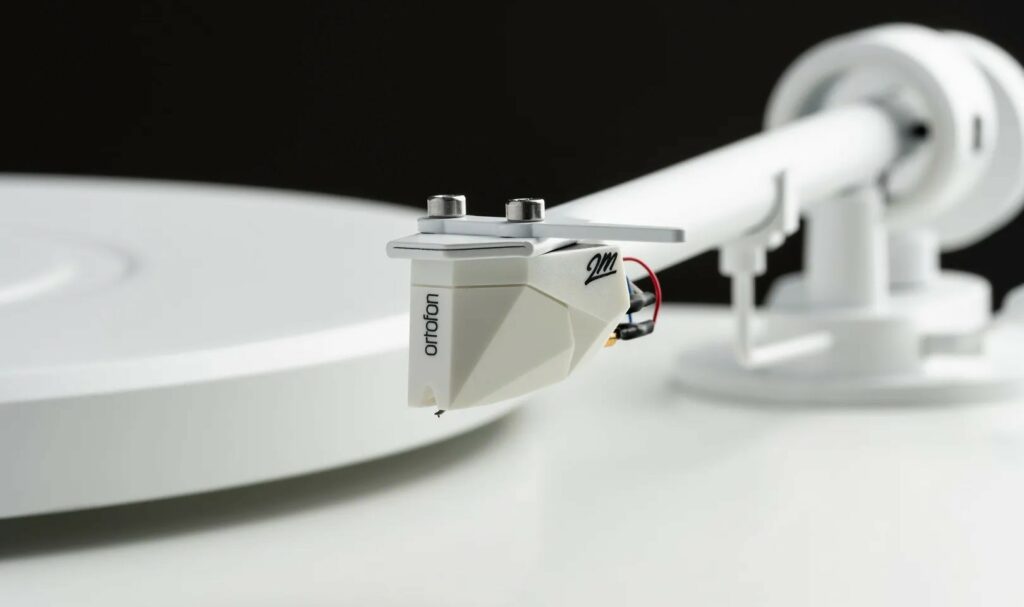
Likewise, a ready-to-play deck does not remove the need for careful placement. The Pro-Ject T1 White Edition arrives with a pre-assembled MM cartridge and a supplied phono cable, which simplifies installation, but the surface should still be level, the stylus guard removed only for playback and the deck kept clear of vibration.

Modern wireless models add another diagnostic branch rather than eliminating the wired one. The TEAC TN-400BTX combines a belt-drive design with a built-in phono stage, Bluetooth transmission and an external-phono option. If wireless playback fails, prove the turntable and phono output through a wired connection first; then address pairing and receiver range separately.
Final checklist
- Use a clean, known-good record and confirm the platter is spinning at the selected speed.
- Check the amplifier input, mute, volume and left/right RCA connections.
- Match PHONO or LINE output to the correct amplifier or phono-stage input.
- Connect the ground wire where specified, without defeating safety grounding.
- For missing channels, swap RCA connections at the amplifier to locate the fault.
- Check cartridge type, alignment, tracking force and anti-skating before treating skips as a hardware failure.
- For hum or dropouts, separate signal cables from power supplies and re-pair Bluetooth devices.
- Stop and seek service if there is damaged wiring, overheating, a damaged stylus or an apparent internal fault.