
Software updates can be easy to overlook in a market often driven by new hardware, but Google’s latest Android and Wear OS additions are worth noting for the way they refine everyday interaction. Rather than centering on a single flagship feature, the update brings a collection of tools designed to reduce friction across phones, wearables, Google Drive, Keep, Meet, Chrome, and Chromebook laptops. For users who rely on mobile devices as part of a wider digital routine, including work, travel, communication, and media control, the attraction is straightforward: common tasks should take fewer steps and feel more consistent across devices.
A software update built around everyday usefulness
The most distinctive quality of this Android and Wear OS update is its practical spread. Google is not presenting one narrow enhancement for one type of user. Instead, the update touches documents, notes, video calls, web browsing, wearables, and Bluetooth pairing. That matters because many Android users do not experience their phone as a single-purpose device. It is a document reader, meeting terminal, note pad, browser, notification hub, and pairing point for accessories.
For a prospective owner already invested in Google’s ecosystem, the value is in continuity. A note can be more visible on the phone home screen. Google Keep becomes quicker to reach on Wear OS. PDFs in Drive can be annotated without requiring a separate workflow. Chrome gains a major accessibility-oriented zoom function. Chromebooks are set to receive Fast Pair for Bluetooth devices. None of these changes needs to be dramatic in isolation to be useful; together, they suggest a platform being adjusted around the small actions people repeat every day.
Google Drive PDF annotations add flexibility without disturbing the original file
One of the more useful additions is the ability to add annotations in the PDF tool inside the Google Drive mobile app. These annotations can be created and edited using either the virtual keyboard or a stylus, which gives the feature value across different device types and working styles. A phone user can add a short written note quickly, while a tablet user with a stylus can work in a more direct, pen-like way.
The detail that makes this implementation especially considered is the option for annotations to exist as a separate file when it is important to keep the searchable contents of the PDF intact. That can matter in professional and academic settings, where the original document may need to remain clean, searchable, and easy to archive. It also helps when several people need to discuss or mark up a document without turning the source file into a cluttered working copy. For anyone who stores manuals, planning documents, invoices, meeting materials, or reference PDFs in Drive, this is the kind of function that can make a mobile device more credible as a working tool rather than just a viewing screen.
Google Keep becomes more visible and more editable
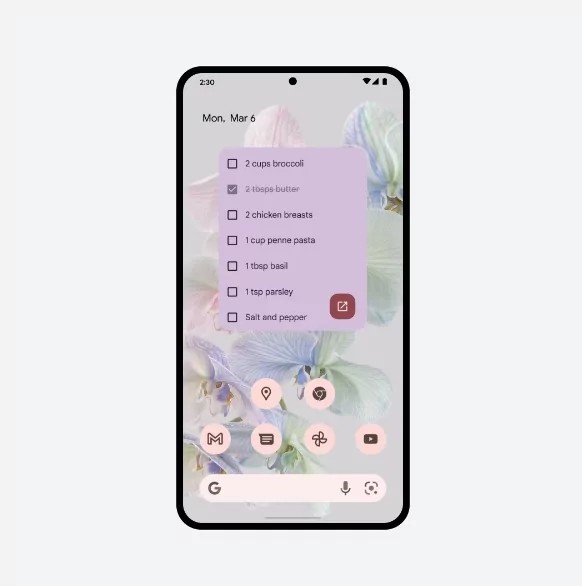
Google Keep receives attention on both Android and Wear OS. On Android, users will be able to display a single note directly on the screen and edit it without launching the full application. That is a meaningful usability change because notes often serve as quick-access information: a packing list, a reminder, a work checklist, or a short set of tasks. Reducing the need to open the app makes the note behave more like part of the workspace.
The new Android widget also supports management of bulleted lists, a capability not available in the current Google Keep version described in the supplied information. For users who organize tasks as lists rather than paragraphs, that is more than cosmetic. It makes the widget more useful as an active tool, not merely a passive note display. Google has also tied the widget’s color scheme to the desktop background, helping it sit more naturally on the home screen instead of looking like a disconnected panel.
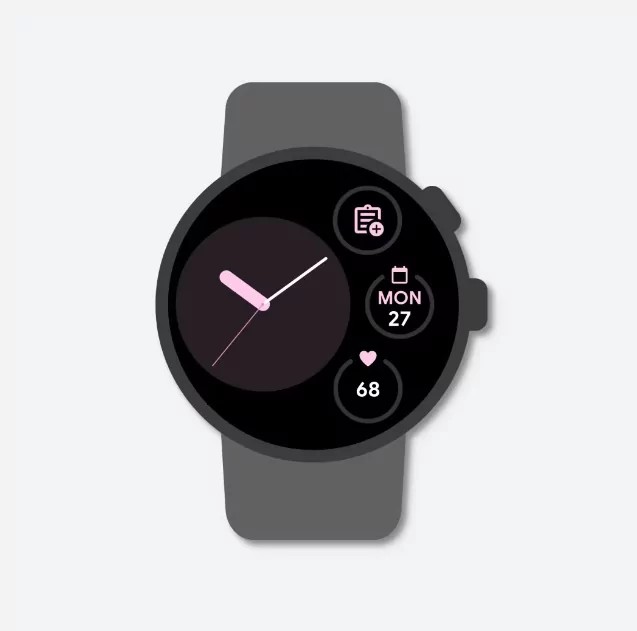
On Wear OS, the Keep app icon can be brought to the desktop, giving users quicker access to creating and editing notes from the watch. This is a sensible direction for a wearable interface. Watches are not ideal for long-form input, but they are useful for capturing or checking small pieces of information quickly. The update’s design logic is therefore consistent: Keep is being made easier to reach in the places where short notes are most useful.
Meet noise reduction and Chrome zoom address comfort and accessibility
Google Meet gains broader device support for noise reduction, intended to make communication more comfortable and productive. The source information does not list the newly supported devices, so the significance here is best understood at the feature level. Noise reduction can be especially useful when mobile users are joining calls from less controlled environments. In a practical sense, expanding device availability helps make the Meet experience less dependent on being at a desk with ideal conditions.
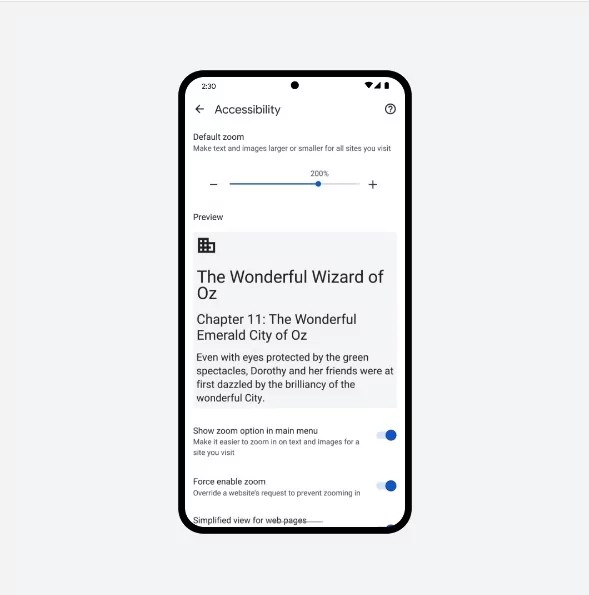
Chrome’s mobile browser update is also notable. Users can increase content size up to 300 percent of the original without harming the design of web pages. That is an accessibility and comfort feature, but it is also a general usability improvement. Many mobile pages contain dense text, small interface elements, or layouts that become awkward when enlarged through basic zooming. Preserving page design while allowing such a large increase gives users more control over readability without forcing them to fight the page layout. For anyone who reads documentation, product information, support pages, or long-form articles on a phone, that can make the device easier to use for extended periods.
Fast Pair on Chromebooks extends the ecosystem approach
Chromebook laptops are expected to receive support for Fast Pair, Google’s technology for quickly pairing Bluetooth devices. While the update is described for the near future rather than as an immediate feature, it fits the wider theme of reducing setup friction. Bluetooth pairing is one of those routine actions that can still interrupt the flow of work or entertainment, especially when moving between devices.
For Stereoindex readers, the relevant point is not that this update turns a Chromebook into specialist audio hardware. It does not claim to do that. The interest is that many people use Bluetooth accessories as part of everyday listening, calling, and media control. A faster pairing process can make a laptop feel more integrated with the devices a user already carries, whether for meetings, casual listening, or general mobile use. In a broader system sense, Fast Pair support makes the Chromebook a more coherent participant in Google’s device ecosystem.
Who this update is most suitable for
This update is most suitable for users who already depend on Google services across more than one device. Android phone owners who use Drive, Keep, Meet, and Chrome are likely to see the clearest benefit, because the new features appear in tools they may already use daily. Wear OS users gain from quicker Keep access, especially if they want the watch to serve as a small extension of their phone rather than only as a notification screen. Chromebook users may appreciate the coming Fast Pair support if they regularly connect Bluetooth devices.
It is less relevant for users who do not use Google’s productivity apps, rarely annotate PDFs, avoid video calls, or have no interest in Wear OS or Chromebooks. It also should not be mistaken for an audio-focused platform update based on the documented information. The strengths here are workflow, accessibility, communication, and device convenience, not new playback formats or hi-fi performance claims. That balance is important: the update is attractive because it improves the connective tissue around everyday digital life, not because it promises a transformation in one specialist category.
Conclusion
Google’s Android and Wear OS update stands out for practical, well-targeted refinements rather than spectacle. PDF annotations in Drive, more capable Keep widgets, quicker Keep access on Wear OS, broader Meet noise reduction, 300 percent Chrome content scaling, and Fast Pair support coming to Chromebooks all point toward a more convenient ecosystem. Its ideal audience is the user already working across Android, Google apps, wearables, and Chromebook hardware who values fewer steps, clearer access, and smoother device interaction.