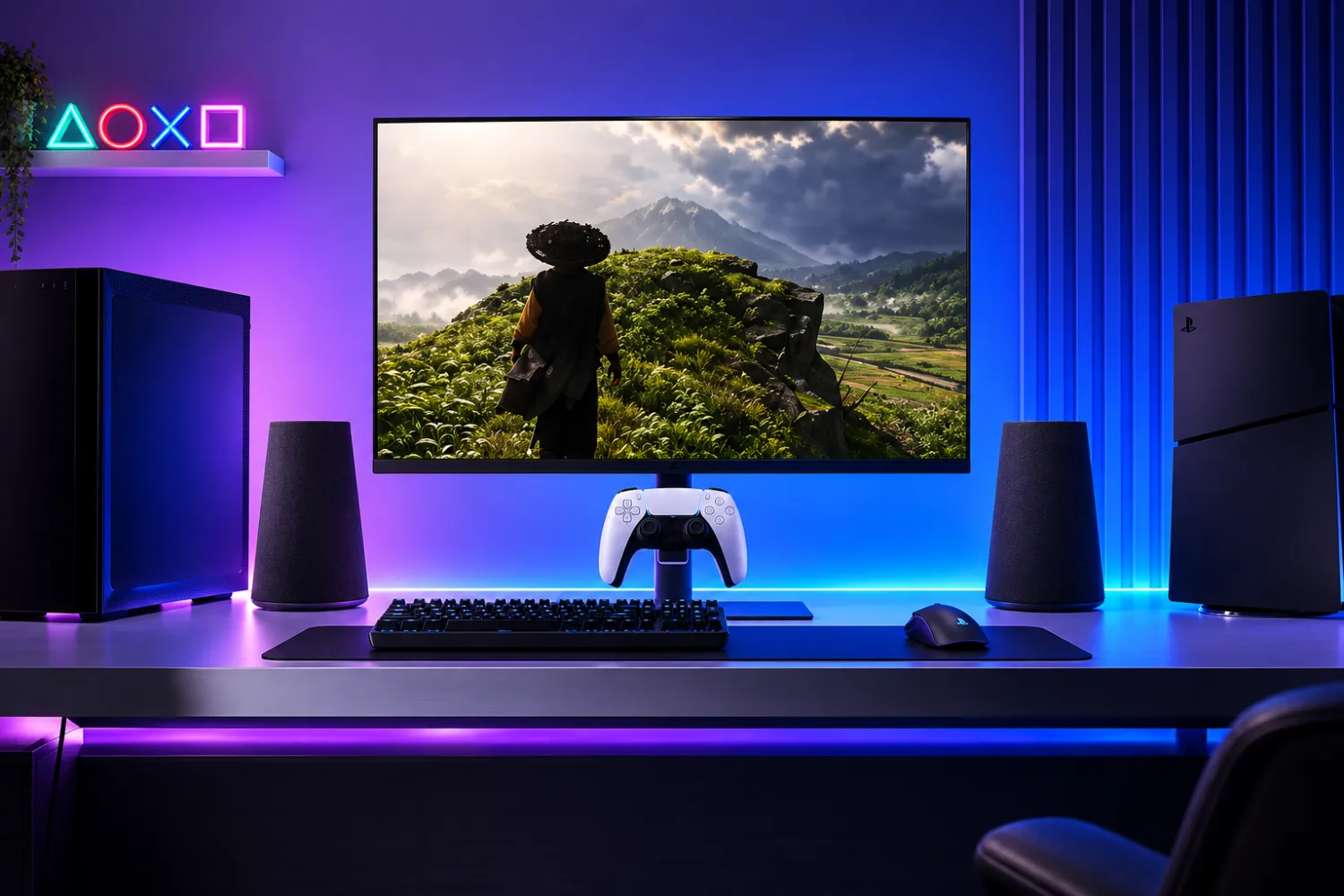
Sony has begun selling a 27-inch gaming monitor aimed primarily at PlayStation 5 and PlayStation 5 Pro owners, while also supporting use with Windows PCs and Macs. The display’s most console-focused feature is integrated charging for DualSense and DualSense Edge wireless controllers, turning the monitor into a more complete desktop gaming station.
A 27-inch display built around PlayStation 5
The monitor uses an IPS panel with a resolution of 2560 × 1440 pixels, positioning it as a compact desktop screen for players who want a dedicated console setup rather than a large living-room TV. The 27-inch size also makes it suitable for a desk, small gaming room or shared workspace where a full-size television may not be practical.
For PlayStation 5 consoles, the display supports refresh rates up to 120 Hz. That matches the upper refresh-rate target available in supported PS5 titles and gives the monitor a clear role as a performance-focused option for console players. The panel also supports VRR, helping compatible games adjust frame delivery more smoothly when refresh rates vary during play.
Sony has also included HDR support with automatic tone adjustment. While HDR results depend on the content being played and the setup being used, automatic tone handling is intended to reduce the manual tuning often associated with HDR displays and consoles. For a monitor aimed at PlayStation users, that kind of integration is a central part of the appeal.
Higher refresh rates when connected to a computer
Although the monitor is presented first as a PlayStation 5 accessory, it is not limited to console use. Sony says it can also be connected to a PC or Mac, making it more flexible for users who want one screen for gaming and everyday desktop tasks.
When attached to a computer, the refresh rate can reach up to 240 Hz. That gives the monitor a different profile on desktop systems than it has on PlayStation 5, where the refresh rate tops out at 120 Hz. The higher refresh ceiling may be relevant for PC players using hardware and games capable of driving faster frame rates.
The monitor also supports AMD FreeSync Premium, adding another variable refresh-rate option for compatible systems. Alongside VRR support, this gives the display a set of gaming-oriented synchronization features across console and computer use cases, without requiring it to be tied to only one platform.
Built-in charging for DualSense controllers
The most distinctive hardware feature is the built-in charging capability for Sony’s wireless controllers. The monitor can charge both DualSense and DualSense Edge gamepads, which makes the display more than a simple screen for PlayStation owners.
For players using a desk-based PS5 setup, controller charging is often handled by a separate dock, cable or console port. Integrating that function into the monitor helps reduce clutter and keeps the controller closer to the display when not in use. It also reinforces the product’s focus on PlayStation users, since controller storage and charging are everyday parts of the console experience.
The inclusion of DualSense Edge support is notable because it means Sony’s premium controller is covered as well as the standard DualSense. That broadens the usefulness of the charging feature for players who have upgraded their input hardware while keeping the same console ecosystem.
Ports for consoles, PCs and peripherals
Connectivity is another important part of the monitor’s positioning. Sony has included two HDMI 2.1 ports, allowing users to connect a PlayStation 5 and another HDMI device without constantly swapping cables. The monitor also includes one DisplayPort 1.4 connection, which is especially relevant for desktop PC setups.
For accessories, the monitor provides two USB Type-A ports and one USB Type-C port. The supplied information does not specify the exact data or power behavior of these ports beyond their presence, but their inclusion gives the display a more complete desktop-friendly layout than a basic console screen.
A 3.5 mm audio output is also included, giving users a wired audio option for headphones or speakers. The monitor has built-in speakers as well, which can be useful for quick sessions, menu navigation or setups where external audio hardware is not connected.
Stand design and setup flexibility
Sony ships the monitor with an ergonomic stand, and the design supports rotation into portrait orientation. That is an uncommon but useful option for a gaming-focused display, particularly for users who may also rely on the screen for productivity, messaging, streaming tools or secondary display duties.
The ability to rotate the panel gives the product more flexibility in mixed console-and-computer environments. A user might keep the screen in landscape mode for PlayStation 5 gaming, then reposition it as needed when used alongside a laptop or desktop system. Sony has not positioned the monitor solely as a productivity display, but the stand’s adjustability helps it fit beyond a single-purpose console role.
Sales have started, but no USD price was provided in the supplied details. As a result, the launch is best understood through the monitor’s feature set: a 1440p IPS panel, console-specific refresh-rate support, PC refresh rates up to 240 Hz, variable refresh features, HDR tone adjustment, controller charging and a broad selection of ports.
Sony’s 27-inch gaming monitor is clearly designed to give PlayStation 5 owners a cleaner and more integrated desktop setup, while still offering enough connectivity and refresh-rate headroom to serve PC and Mac users. Its success will likely depend on how much players value the combination of 1440p gaming, DualSense charging and multi-device support in a single display.