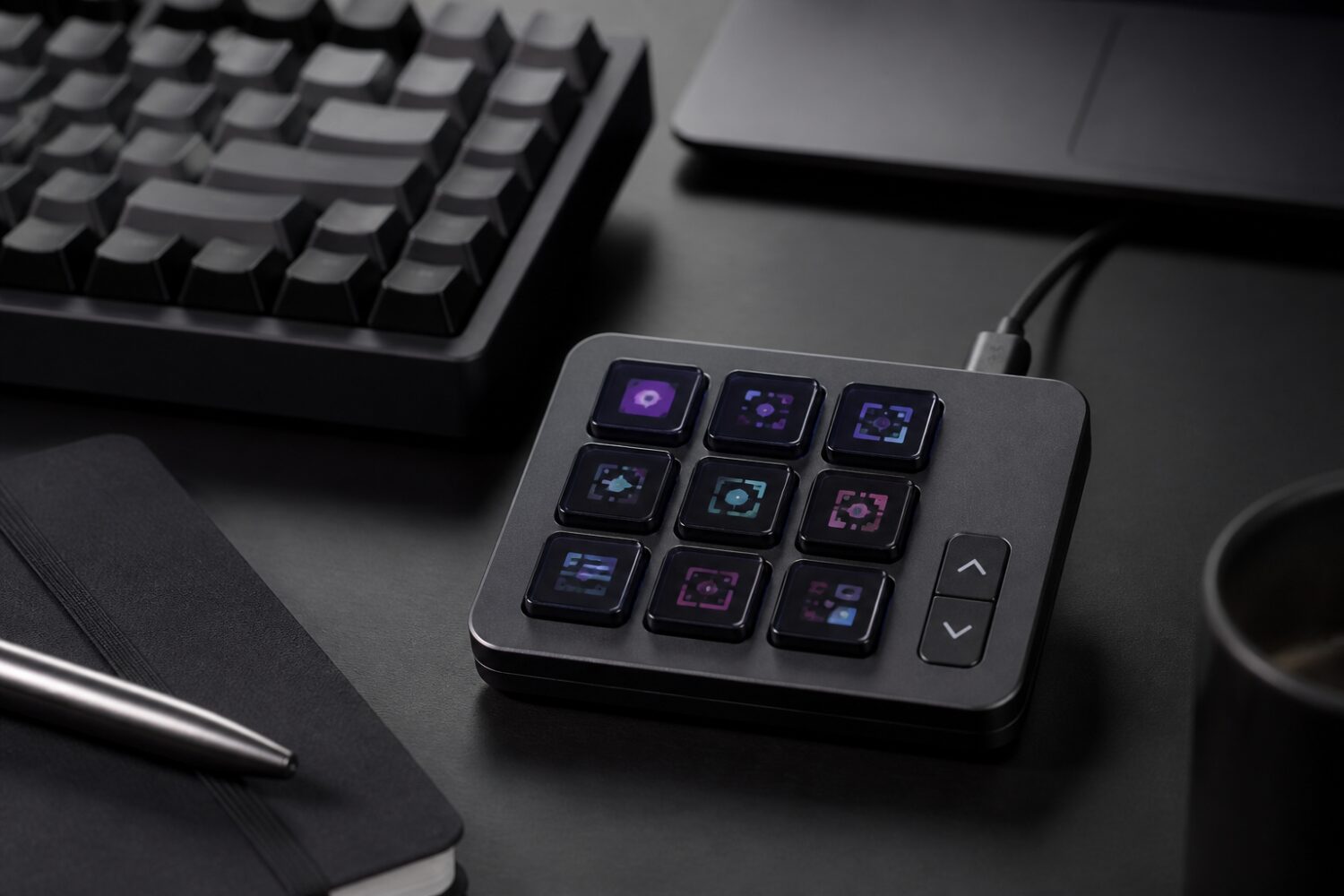
Logitech is expanding its MX lineup with the MX Keypad, a compact USB-C control panel built for developers who want fast access to commands, macros and coding tools from a dedicated desk accessory.
Nine display keys with many more layouts
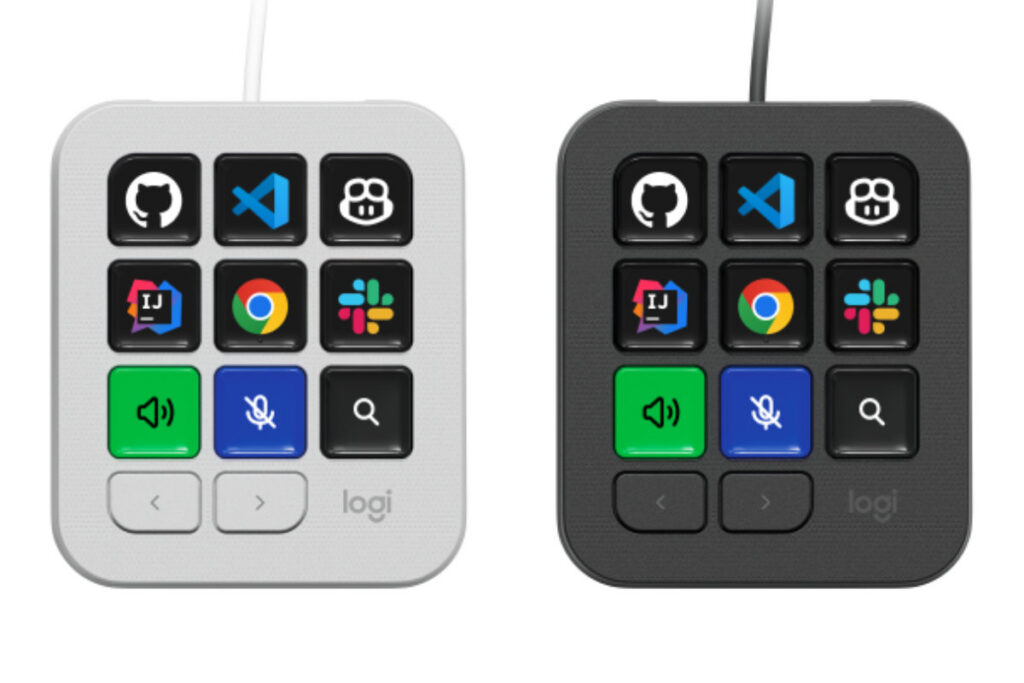
The MX Keypad is a standalone macro pad with nine keys, and each key has its own color display. Users can assign commands, shortcuts, macros and links to development tools, with the key screens showing the relevant labels or icons for the current setup.
Logitech also includes two additional navigation buttons for moving through as many as 15 layout pages. That gives the device room for up to 135 assigned actions, even though only nine display keys are visible at a time. The practical advantage is not simply the number of possible shortcuts, but the ability to organize them by task or application rather than crowding everything onto one page.
Profiles can switch automatically depending on the app in use. For a developer, that could mean one set of controls in a code editor and a different arrangement when moving to another tool. This kind of app-aware behavior is central to whether a macro pad becomes part of a daily workflow or remains a novelty on the desk.
Built with developer tools in mind
Logitech developed the MX Keypad in collaboration with GitHub, and the device ships with built-in support for VS Code and the GitHub Copilot app. Logitech is also bundling three months of GitHub Copilot Pro+ with the keypad. GitHub Copilot Pro+ is listed at $39 per month, though ongoing subscription costs would apply after the included period if users continue with the service.
The positioning is clear: this is not simply a generic shortcut panel aimed at streamers or video editors. Logitech is directing the MX Keypad toward programming workflows, code assistants and software development environments. That focus helps separate it from existing macro pads that have historically been associated with livestreaming, media production and creative applications.
An SDK is available so developers can create their own extensions. Logitech’s ecosystem approach will matter because devices like this depend heavily on software integrations. The more tools that can expose useful commands and status information to the keypad, the more valuable the hardware becomes.
USB-C instead of wireless
Unlike many MX-branded accessories, the MX Keypad is not wireless. It connects through USB-C and does not include a battery. The device measures roughly 9 by 8 centimeters and weighs 96 grams, making it a small desktop accessory rather than a portable keypad intended for frequent travel.
The wired design is notable because Logitech’s MX range is strongly associated with clean desks and wireless productivity gear. In this case, the constant power draw from nine always-visible color displays helps explain the decision. A cable means the keypad can remain active throughout the workday without battery charging becoming another maintenance task.
The trade-off is straightforward: users give up a cable-free setup, but gain an always-on control surface that does not need recharging. For a device designed to live beside a keyboard and provide persistent visual shortcuts, that may be the more practical choice.
Software setup and platform support
Configuration is handled through Logi Options+, Logitech’s companion software. The MX Keypad supports macOS 13 or newer and Windows 10 or newer. Through the software, users assign actions, manage profiles and customize what appears on the individual key displays.
That software dependency is important. The keypad’s value comes from its programmable behavior, dynamic icons and app-linked profiles, all of which rely on Logitech’s software environment. Without continued software support, the hardware would lose much of what makes it useful.
The availability of an SDK may help the device’s long-term prospects by allowing third-party developers to build and maintain extensions. Still, the strength of the ecosystem will depend on how many useful integrations appear beyond the initial support for VS Code, GitHub Copilot and related developer tools.
Colors, materials and availability
The MX Keypad will be offered in graphite and light gray. Logitech says the graphite version uses 64% post-consumer recycled plastic, while the light gray version uses 49%. The difference reflects a common manufacturing limitation: darker finishes can more easily incorporate mixed recycled plastic, while lighter colors often require more new material to achieve a clean appearance.
The device is scheduled to be available from September 8. The supplied launch information lists pricing only in a non-USD currency, so no USD price has been announced here.
For users already invested in Logitech’s productivity ecosystem, the MX Keypad appears designed to sit alongside MX keyboards and mice as a specialized command surface. Its success will depend less on the number of physical keys and more on whether developers find enough repeatable actions to justify giving it permanent space on the desk.
The MX Keypad is Logitech’s clearest attempt to turn the macro pad into a developer-first productivity tool. With display keys, app-aware profiles, USB-C power and GitHub-focused integrations, it targets coders who want faster access to repetitive commands without relying only on keyboard shortcuts.